ABBYY ScanTo Office 1.0

ABBYY ScanTo Office is an efficient scan conversion utility. It scans paper and reproduces documents into editable and searchable Word or Excel files or lets you send them out as e-mail attachments. ScanTo Office is easy to use. You can run the program directly from Microsoft® Word, Excel, Outlook or Windows® Explorer, or simply run the ScanTo Office wizard, which leads you through the simple steps of scanning and converting.

ScanTo Office is an ideal tool for home users or small businesses that need to quickly scan paper so they can edit and reuse the information in seconds.

With a single mouse click, ABBYY ScanTo Office scans paper or converts your scanned images into Microsoft Office documents without the unwieldiness of launching a separate application. This convenient tool helps you quickly unlock and repurpose information from paper documents or image files into Microsoft applications while retaining the original looks and without having to retype or reformat. ABBYY ScanTo Office is : Efficient, Productive, Easy-to-use, Affordable.

One-click conversion
With a single click of a button you can perform multiple tasks at once with ABBYY ScanTo Office - scan a paper document, convert and open it in Microsoft Word, Excel, or send out as an e-mail attachment.
Easy-to-use wizard guides you through simple steps of scan conversion
ABBYY ScanTo Office allows you to run this utility by using a wizard-style interface that guides you through the simple steps of the conversion process from scanning or opening image, through adjusting conversion setting, to output.

Seamless integration with Microsoft Office
ScanTo Office is seamlessly integrated into Microsoft Office applications, such as Word, Excel, and Outlook, and allows you to convert images directly from within these applications; as a result, you can start working on the documents directly from the end application.

Scans and converts documents directly into Microsoft Word and Excel
ABBYY ScanTo Office adds a plug-in button into Word and Excel. You can click a button to scan, convert and edit the document without leaving these applications. The converted results can be opened as a new file or inserted to the Word and Excel document that is currently open.

Scans and sends as e-mail attachment in one step
ABBYY ScanTo Office adds an icon on Outlook’s desktop. You can simply click a button to scan a document and instantly send it out as an e-mail attachment. You will never have to go through the process of launch a separate application, save the scanning result and then go back to Outlook and try to locate the file for attachment.

Accessible from Windows Explorer
With a single right-mouse click, ScanTo Office converts your existing image file into an editable and searchable document and sends it directly to necessary applications or exports it to any supported output format or application.

Layout retained in output document
ABBYY ScanTo Office converts your paper documents or scanned images to editable Microsoft Word or Excel files with the look and feel of the original document. No need to retype or reformat your information.

Support for 37 conversion languages
ABBYY ScanTo Office supports 37 languages, including English, German, French, Dutch, Italian, Spanish, Polish, Czech, Hungarian, Russian, and more. It also reads bi-lingual documents by selecting a secondary language.

Automatic book scanning
You can scan opposing pages of a book at the same time. You simply place the book face-down on a scanner, check the Split-page option, and then ScanTo Office will automatically scans both sides at the same time and splits image into two pages.

Download

Mp3Doctor 5.11.049


MP3Doctor is an editing tool that lets you check, modify, and improve your MP3 and WAV files. You can repair imperfect songs or modify them with trimming, equalizing, and resampling. The goal is to let you maintain similar quality, volume, and sound on all your MP3s. In addition, the program converts MP3 files to WAV and vice versa.

Moreover, the program can handle ID3 tags of MP3 files. The normalize function allows you to get the lower parts of a song to higher levels and to standardize your MP3 collection. The karaoke feature lets the user remove the vocals of an MP3 or WAV file. The pitch and tempo features let the user change tempo (BPM) without changing the pitch, or vice versa.

Download

LimeWire Pro v4.16.6


Limewire is a popular peer-to-peer file sharing program for Windows, Mac, Linux and Solaris from Lime Wire LLC, New York. Written in Java and released at the end of 2001, LimeWire is a client program for the Gnutella network. LimeWire PRO gives users better search results, turbo-charged download speeds, connections to more sources, a guarantee of no ads or nagware, a special PRO only skin, personalized support via email and free updates.

Features :
* Ease of use. Just install, run, and search.
* Ability to search by metadata information.
* Elegant multiple search tabbed interface.
* “Swarm” downloads from multiple hosts help you get files faster.
* iTunes integration for Mac and Windows users.
* Unique “ultrapeer” technology reduces bandwidth requirements for most users.
* Integrated chat.
* Browse host feature. Even works through firewalls.
* Added Bitzi metadata lookup.
* International versions: Now available in many new languages.
* Connects to the network using GWebCache, a distributed connection system.
* Automatic local network searches for lightning-fast downloads. If you’re on a corporate or university network, download files from other users on the same network almost instantaneously!.
* Support for MAGNET links that allow you to click on web page links that access Gnutella.

Download

Age of Empires III : The Asian Dyanasties


Since Age of Empires debuted in 1997, the series has grown to become one of the pillars of real-time strategy gaming. Its success is in part due to the way the series has shifted historical periods. The first game covers antiquity, from the Stone Age to the Roman Empire. Meanwhile, Age of Empires II focuses on the medieval era. And 2005's Age of Empires III is about the era of European exploration and colonization. This brings us to Age of Empires III: The Asian Dynasties, the second expansion pack and the first game in the franchise not created by Ensemble Studios. Big Huge Games, creator of Rise of Nations and Rise of Legends, is responsible for The Asian Dynasties, and the company ably delivers a solid expansion.

The Chinese
discoverthe New World in The Asian Dynasties

What the expansion brings to the table are three new Asian civilizations - Japan, China, and India - as well as three campaigns built around them. The Japanese campaign deals with the Warring States period of rival Shogun; the Chinese campaign actually covers a naval expedition to the New World; and the Indian campaign is about throwing off the oppressive yoke of the East India trading company. The campaigns have their twists and turns, with a fair amount of betrayal going on, though the characters are drawn in such obviously black-and-white textures that it's not too hard to see the plot developments coming. For instance, most of the bad guys in the game speak with haughty, arrogant voices, while the good guys tend to be humbler and wiser.

The heart of the expansion is the three Asian civilizations, and Big Huge has done a good job in making them feel distinct from those seen in Age of Empires III. The Japanese are built around extremely powerful infantry units like samurai, while the Chinese and Indians can easily bring sheer mass to a battle in the form of large armies. The various economies reflect historical trends; for example, the Chinese and Indians can quickly boost their populations, giving them hordes of villagers to gather resources. One of the most important new features is actually the reintroduction of wonders to the game. Wonders are notable structures from history, and they played a significant role in the first two Age of Empires games, only to disappear in Age of Empires III. They're back in The Asian Dynasties, and each Asian civ has five to choose from. The ones that you select can help define your play style; we like the Chinese wonder that grants transcendence, or the ability to heal all your units instantly. That's particularly useful if you like to go on the offensive. Other wonders can boost resource gathering, grant free armies, and so on. Wonders are also important because they're the only way the Asian civilizations can advance from one technological age to another.

At the same time, the core game remains relatively the same. It's all about getting a large number of villagers out there gathering the three primary resources (food, wood, and gold) that are needed to build all your buildings, recruit your units, research your upgrades, and then advance to the next technological age to repeat the process all over again. The home cities concept is still here; you can request reinforcements or supplies from your civilization's capital. You do this by using special cards that you unlock. There are cards that can send military units, villagers, and resources, for example. You can also build custom decks that are designed for various strategies, like an economic deck that gives you bonus powers that aid your economy. Another unique aspect of the Asian civs is that they can use many of these cards twice, which can really help ramp up the size of an army or economy quickly. Serious players will no doubt spend lots of time analyzing the possible unlocks and building customized decks for different play styles, though you don't need to expend that much effort if you're a casual player, as the default deck is good enough.

One new feature is the foreign consulate, which allows Asian civilizations to ally with a European power and purchase reinforcements using tribute, which is a fourth resource that's unique to Asian civs. Tribute is basically a tax on your economy, and you can increase your rate of tribute at the price of a slightly slower economy, but what it does is allow you to purchase rare and powerful European units. The sudden appearance of a European army or navy to the battle can turn the tide of battle. Since you need to have Age of Empires III to play The Asian Dynasties, you can pit European and Asian civilizations against one another in skirmish or multiplayer modes on a wide variety of maps. Want to have Chinese warriors in New England? Go for it. The sides seem relatively well balanced even though they differ in how they advance from age to age. The Europeans tend to have a technological advantage, though the Asian civs tend to have a numerical one.


The home city concept gets an Asian makeover

The Asian Dynasties does add some visual pizzazz in the form of architecture; the majestic wonders and buildings pop out on the screen. There's also plenty of variety among the units, from Indian war elephants to Chinese steppe riders and Japanese samurai. The music also offers some appropriately cultural queues (though it reuses much of the existing Age of Empires III score).

Like The WarChiefs expansion from last year, The Asian Dynasties does a good job of introducing distinct new civilizations to Age of Empires III only this time, instead of Native American tribes, there are three iconic Asian civilizations to play with now. There's a fair amount here to dig into if you're a serious Age of Empires fan or someone who likes Asian civilization.

Download :
part 1
part 2
part 3
part 4

part 5
part 6
part 7

pass :
www.NWF.cz

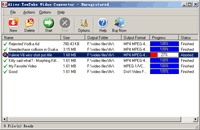
Alive YouTube Video Converter v1.2.8.8


Alive YouTube Video Converter is a professional YouTube video downloader to download and convert youtube videos to popular formats directly, the output formats include AVI, MPEG, MP4, DivX, XviD, ASF, WMV, MOV, QuickTime, VOB, iPod, PSP, 3GP, iPhone, Zune, MP3, AAC, AC3 and M4A. So you are able to burn a CD or DVD for those videos, copy them to other computer, or upload them onto your iPod/iPhone, mobile phone, PocketPC, PDA, PSP or any other portable devices.

Alive YouTube Video Converter is a multi-thread program and supports batch conversion. This feature lets you download and convert diferrent videos at the same time. In addition, The intuitive interface makes Alive iPod Video Converter the perfect tool for both new and experienced users. It gives advanced users the ability to convert youtube videos with width*height, video size, bit rate, and frame rate adjusting! It makes downloading videos from the internet and watching them from your PC, cell phone, iPod, PSP, Zune, MP4 player or TV quick and easy.

Main Features:

  • Download video from YouTube, Google Video and MySpace
    Our youtube video converter allows you to download and convert video from YouTube.com, Google Video and MySpace.com.
  • Output most populart video and audio formats
    Alive YouTube Video Converter can convert the video into many different formats, such as AVI, MPEG, MP4, DivX, XviD, 3GP, WMV, VOB, QuickTime MOV, ASF, iPod, iPhone, PSP, Zune, Mobile Phone, Archos, iRiver, Creative Zen Vision, Sandisk Sansa. You can also convert the video to the popular audio formats including MP3, AAC, M4A, AC3.
  • Windows Clipboard Monitor
    This utility can monitor the Windows Clipboad. It will analyze the URL automatically and detemite if it is an available YouTube online video URL when you Copy any URL. If the URL you copied is an available YouTube video URL, Alive YouTube Video Converter will start a new task for you to download the video.
  • Multithread, batch download and conversion
    This feature gives you the ability to download and convert several videos at one time and makes the day-to-day download and convesion tasks nothing, but a pleasant experience.
  • Super fast download and conversion speed
    With the powerful built-in download and convert engine, Alive YouTube Video Converter gives you a unbelievable experience of high speed download and conversion.
System Requirements:
  • Microsoft Windows 95/98/ME/NT/2000/XP/2003/Vista;
  • 366MHz or higher CPU;
  • 64M RAM or biger RAM;
  • About 50M free HD space;
  • Internet connection.

Download

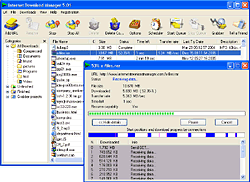
Internet Download Manager 5.12

Internet Download Manager (IDM) is a tool to increase download speeds by up to 5 times, resume and schedule downloads. Comprehensive error recovery and resume capability will restart broken or interrupted downloads due to lost connections, network problems, computer shutdowns, or unexpected power outages. Simple graphic user interface makes IDM user friendly and easy to use.

Internet Download Manager has a smart download logic accelerator that features intelligent dynamic file segmentation and safe multipart downloading technology to accelerate your downloads. Unlike other download managers and accelerators Internet Download Manager segments downloaded files dynamically during download process and reuses available connections without additional connect and login stages to achieve best acceleration performance.

Internet Download Manager supports proxy servers, ftp and http protocols, firewalls, redirects, cookies, authorization, MP3 audio and MPEG video content processing. IDM integrates seamlessly into Microsoft Internet Explorer, Netscape, MSN Explorer, AOL, Opera, Mozilla, Mozilla Firefox, Mozilla Firebird, Avant Browser, MyIE2, and all other popular browsers to automatically handle your downloads. You can also drag and drop files, or use Internet Download Manager from command line. Internet Download Manager can dial your modem at the set time, download the files you want, then hang up or even shut down your computer when it's done.

Other features include multilingual support, zip preview, download categories, scheduler pro, sounds on different events, HTTPS support, queue processor, html help and tutorial, enhanced virus protection on download completion, progressive downloading with quotas (useful for connections that use some kind of fair access policy or FAP like Direcway, Direct PC, Hughes, etc.), built-in download accelerator, and many others.

Version 5.12 build 7 adds complete Vista support, YouTube grabber that can be used to download FLV videos from YouTube, Google Video, and MySpaceTV, redeveloped scheduler, MMS protocol support and the site grabber feature. This feature not only lets you download required files that are specified with filters, for example all pictures from a web site, or all audio files from a web site, but it also lets you download subsets of web sites, or complete web sites for mirroring or offline browsing. It's possible to schedule multiple grabber projects to run them once at a specified time, stop them at a specified time, or run periodically to synchronize changes. The new version also adds improved browser integration, redesigned and enhanced download engine, the unique integration into all latest browsers, improved toolbar, and a wealth of other improvements and new features.

Download

Chainz

Prepare for a truly unique puzzle challenge with Chainz. Connect colorful chains, and create fantastic chain-reactions for bonus points. Play at your own pace in Normal mode, or beat the clock in Time Attack. Simple game controls and energized colors make Chainz a delight for your whole family.

Features :
Relax and play in Normal Mode.
Race the clock in Time Attack Mode.
Use the Hint Button when you get stuck.
Play Offline and Full Screen

System Requirements :
- Windows 98/ME/2000/XP
- 300MHz or faster Processor
- 64MB RAM
- DirectSound-compatible Sound Card
- DirectX 7.0 or better

Download